

MareArts Road Objects Detector
viewsPython SDK · 8 classes · pip
MareArts Road Objects
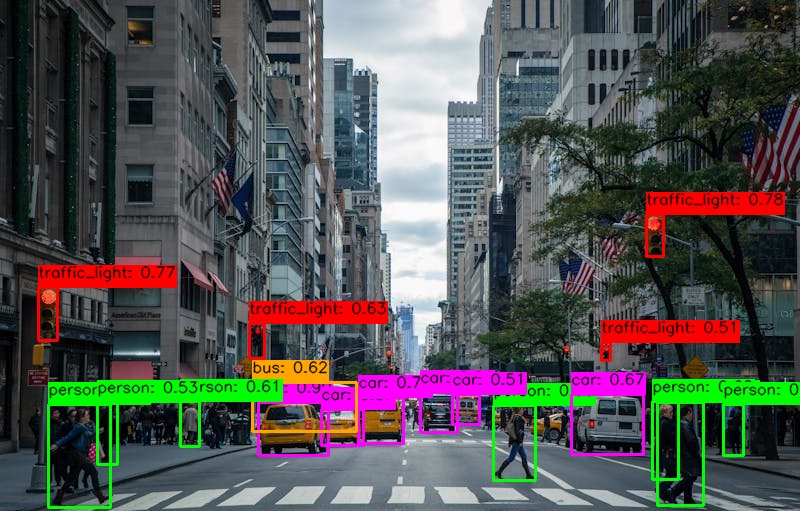
Detect person, bicycle, motorcycle, car, bus, truck, traffic light, and stop sign. Same license as the ANPR SDK. CPU, CUDA, and DirectML.
PyPI package marearts-road-objects · Python 3.9–3.12 · current release 2.0.6.
Install
pip, then GPU extra if you have one
# CPU — Windows, macOS, Linux, ARM
pip install marearts-road-objects

# NVIDIA CUDA
pip install "marearts-road-objects[gpu]"

# Windows AMD / Intel / NVIDIA
pip install "marearts-road-objects[directml]"
onnxruntime and onnxruntime-gpu cannot both stay installed. If CUDA does not run after the extra, uninstall the CPU package then install the extra again. This package has no gpu-setup command.
ma-robj config
ma-robj validate
Credentials go to ~/.marearts/.marearts_env (same files as ANPR), or set MAREARTS_ANPR_USERNAME, MAREARTS_ANPR_SERIAL_KEY, and MAREARTS_ANPR_SIGNATURE.
Aliases: ma-robj, marearts-robj, marearts-road-objects.
Python
Load once, then call detector
import cv2
from marearts_road_objects import ma_road_object_detector

detector = ma_road_object_detector(
    model_name="small_fp32",   # small_fp32, medium_fp32, large_fp32
    user_name=user_name,
    serial_key=serial_key,
    signature=signature,
    backend="auto",            # auto, cuda, directml, cpu
    conf_thres=0.5,
    iou_thres=0.5,
)

image = cv2.imread("traffic.jpg")
result = detector.detector(image)
print(result)
# {'results': [{'ltrb': [...], 'ltrb_conf': 85, 'class_id': 3, 'class': 'car'}, ...],
# 'ltrb_proc_sec': 0.08}Construct the detector outside the loop. The first call downloads the model. After that each frame is milliseconds.
The call is detector.detector(image) on a BGR array. There is no .detect() and the model names are not ANPR’s 640p_fp32.
{
    'results': [
        {
            'ltrb': [88.1, 421.0, 164.9, 476.2],
            'ltrb_conf': 85,
            'class_id': 3,
            'class': 'car'
        }
    ],
    'ltrb_proc_sec': 0.178
}
Models
small, medium, large
Times from the GitHub README, CUDA on an NVIDIA GeForce RTX.
| Name | Size | Speed (README) | Use |
|---|---|---|---|
small_fp32 |
102 MB | 8 ms · 125 fps | Default. Throughput. |
medium_fp32 |
195 MB | 83 ms · 12 fps | More accuracy. |
large_fp32 |
314 MB | 96 ms · 10 fps | Highest accuracy. |
First run downloads the model. Production: export MAREARTS_ROBJ_SKIP_UPDATE=1 skips the update check. Verbose: export MAREARTS_VERBOSE=1.
Classes
Eight labels
| ID | Class | Notes |
|---|---|---|
| 0 | person |
Pedestrians |
| 1 | bicycle |
|
| 2 | motorcycle |
Scooters too |
| 3 | car |
|
| 4 | bus |
|
| 5 | truck |
Vans too |
| 6 | traffic_light |
|
| 7 | stop_sign |
CLI
ma-robj
ma-robj config
ma-robj validate
ma-robj detect traffic.jpg
ma-robj detect traffic.jpg -m medium_fp32 -b cuda
ma-robj gpu-info
ma-robj version
ANPR
One serial
The ANPR SDK license unlocks this package. Plate reading is a separate install: pip install marearts-anpr.
Intro: ANPR SDK · Mobile app.
Support
Start
- Road Objects uses the ANPR SDK license (SDK + MASS), which is separate from ANPR Mobile and is not issued yet. It opens with the next SDK release.
-
pip install marearts-road-objectsthenma-robj config. - Try the live demo in the browser.
Road Objects and the ANPR SDK share the license. Existing MareArts ANPR (SDK + Mobile) subscribers use the serial they already have. A license belongs to one email and cannot be moved.
| Contact | hello@marearts.com |
| GitHub | MareArts/MareArts-Road-Objects |
| Live demo | live.marearts.com |
| PyPI | marearts-road-objects |
| Video | Road Objects SDK |
marearts-road-objects 2.0.6 · Python 3.9–3.12